.png)
Complete PC Building Guide for Beginners in Nepal
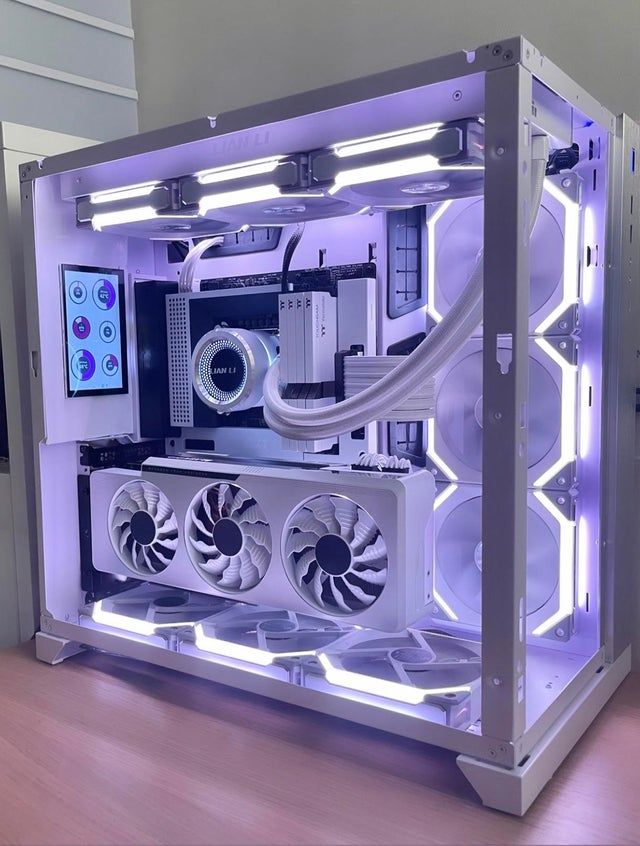
Building your own PC in Nepal can be an exciting and rewarding experience. Not only do you save money compared to buying pre-built systems, but you also get exactly the components you want for your specific needs. Whether you're building a gaming rig, workstation, or everyday computer, this comprehensive guide will walk you through every step of the process.
In this guide, we'll cover everything from selecting compatible components to assembling your PC, with special consideration for pricing and availability in Nepal's market.
Table of Contents
Why Build Your Own PC?
Building your own PC offers several advantages over buying pre-built systems, especially in the Nepali market:
- Cost Savings: Save 15-25% compared to pre-built PCs by avoiding assembly charges and markup
- Customization: Choose exactly the components that match your needs and budget
- Better Quality: Select higher-quality parts instead of mystery components in pre-builts
- Learning Experience: Understand how your computer works and troubleshoot issues yourself
- Upgradability: Easily upgrade individual components as needed in the future
- Warranty: Individual component warranties often better than pre-built system warranties
Expert Insight
In Nepal's current market, building your own PC can save you anywhere from Rs. 15,000 to Rs. 50,000 depending on your budget tier, while giving you better component quality and performance.
Essential PC Components Explained
Every PC build requires these core components. Let's break down what each does and what to look for:
1. Processor (CPU)
The brain of your computerThe CPU handles all computing tasks and calculations. Your choice depends on your usage:
- Gaming: Intel Core i5/i7 or AMD Ryzen 5/7 (13th/14th Gen Intel or Ryzen 5000/7000 series)
- Office/General Use: Intel Core i3 or AMD Ryzen 3/5
- Content Creation: AMD Ryzen 7/9 or Intel Core i7/i9 (higher core counts)
Nepal Price Range: Rs. 15,000 - Rs. 80,000
2. Motherboard
Connects all components togetherThe motherboard must be compatible with your CPU socket type. Key considerations:
- Socket Type: LGA1700 (Intel 12th/13th/14th Gen) or AM5 (AMD Ryzen 7000) or AM4 (Ryzen 5000)
- Chipset: B660/B760 for Intel, B550/B650 for AMD (budget), or Z690/Z790/X670 (premium)
- Form Factor: ATX (full-size), Micro-ATX (compact), or Mini-ITX (smallest)
- Features: WiFi, RGB headers, M.2 slots, USB ports
Nepal Price Range: Rs. 10,000 - Rs. 45,000
3. RAM (Memory)
Temporary storage for active tasksRAM allows your PC to multitask effectively. Modern builds require:
- Capacity: 16GB minimum for gaming/multitasking, 32GB for content creation
- Type: DDR4 or DDR5 (must match motherboard support)
- Speed: 3200MHz+ for DDR4, 5600MHz+ for DDR5
- Configuration: Buy in pairs (2x8GB or 2x16GB) for dual-channel performance
Nepal Price Range: Rs. 8,000 - Rs. 25,000 (16GB kit)
4. Graphics Card (GPU)
Essential for gaming and graphics workThe GPU renders graphics and is crucial for gaming and creative work:
- 1080p Gaming: NVIDIA RTX 3060/4060, AMD RX 6600/7600
- 1440p Gaming: NVIDIA RTX 4060 Ti/4070, AMD RX 7700 XT/7800 XT
- 4K Gaming: NVIDIA RTX 4080/4090, AMD RX 7900 XT/XTX
- Budget/Office: Integrated graphics (Intel UHD/Iris Xe or AMD Radeon) may be sufficient
Nepal Price Range: Rs. 25,000 - Rs. 350,000+
5. Storage (SSD/HDD)
Stores your operating system and filesModern PCs use SSDs for speed. Recommended setup:
- Primary Drive: 500GB-1TB NVMe M.2 SSD for OS and programs (crucial for speed)
- Secondary Storage: 1-2TB HDD or SATA SSD for files, games, media (optional but recommended)
- Brands: Samsung 970/980, WD Blue/Black SN770, Crucial P3/P5
Nepal Price Range: Rs. 4,500 - Rs. 18,000 (500GB-1TB SSD)
6. Power Supply (PSU)
Powers all components reliablyNever cheap out on the PSU. It protects your entire system:
- Wattage: 550W (basic), 650-750W (gaming), 850W+ (high-end/future-proof)
- Efficiency: 80+ Bronze minimum, 80+ Gold recommended, 80+ Platinum for premium
- Modular: Semi or fully modular for easier cable management
- Brands: Corsair, EVGA, Seasonic, Cooler Master, Thermaltake (avoid generic brands)
Nepal Price Range: Rs. 6,000 - Rs. 25,000
7. PC Case
Houses and protects componentsChoose a case that fits your motherboard and has good airflow:
- Size: Must fit your motherboard (ATX, Micro-ATX, Mini-ITX)
- Airflow: Look for mesh front panels and multiple fan mounting points
- Features: Cable management, dust filters, tempered glass panel (optional)
- Cooling: Pre-installed fans save money (2-3 fans minimum)
Nepal Price Range: Rs. 3,500 - Rs. 20,000
8. CPU Cooler (Optional but Recommended)
Keeps processor temperatures in checkWhile CPUs come with stock coolers, aftermarket coolers offer better performance:
- Budget: Stock cooler included with CPU (sufficient for non-overclocking)
- Mid-Range: Tower air coolers like Cooler Master Hyper 212, DeepCool AK400
- Premium: Noctua NH-D15, be quiet! Dark Rock Pro 4
- Liquid Cooling: AIO liquid coolers for aesthetics and extreme cooling (240mm-360mm)
Nepal Price Range: Rs. 2,000 - Rs. 15,000
Budget Planning for Nepal
Here are realistic PC build budgets for Nepal's market in 2024-2025. Prices may vary by ±10% depending on availability and retailer:
| Component | Entry-Level Office | Mid-Range Gaming | High-End Gaming |
|---|---|---|---|
| CPU | Intel i3-13100 / Ryzen 5 5600 | Intel i5-13400F / Ryzen 5 7600 | Intel i7-14700K / Ryzen 7 7800X3D |
| Motherboard | H610 / A520 | B660 / B650 | Z790 / X670E |
| RAM | 8GB DDR4 3200MHz | 16GB DDR4 3600MHz | 32GB DDR5 6000MHz |
| GPU | Integrated Graphics | RTX 4060 / RX 7600 | RTX 4070 Ti / RX 7900 XT |
| Storage | 512GB NVMe SSD | 1TB NVMe SSD | 1TB NVMe + 2TB HDD |
| PSU | 450W 80+ Bronze | 650W 80+ Gold | 850W 80+ Gold |
| Case | Basic ATX Case | Mid-Tower w/ Airflow | Premium ATX Case |
| Cooler | Stock Cooler | Stock / Basic Tower | Tower / 240mm AIO |
| Total (Approx.) | Rs. 45,000 - 55,000 | Rs. 1,10,000 - 1,30,000 | Rs. 2,50,000 - 3,00,000 |
Important Note
These are approximate prices based on current Nepal market rates. Always check with multiple retailers like Itsuppliespasal for the latest prices and deals. Component prices can fluctuate based on global supply, exchange rates, and local availability.
Compatibility Checklist
Before purchasing components, verify these critical compatibility factors:
CPU and Motherboard Compatibility
- Socket type must match (e.g., LGA1700 for Intel 12th-14th Gen)
- Chipset must support your CPU generation
- BIOS version may need updating for newer CPUs
RAM Compatibility
- DDR4 or DDR5 must match motherboard support (they're not interchangeable)
- Check maximum supported speed (e.g., 3200MHz, 5600MHz)
- Verify maximum capacity (most boards support 32-128GB)
GPU Clearance
- Measure GPU length and compare with case specs
- Ensure PCIe slot on motherboard (all modern boards have this)
- Check PSU has required PCIe power cables (6-pin, 8-pin)
Power Supply Wattage
- Calculate total system wattage using online PSU calculators
- Add 20-30% headroom for efficiency and future upgrades
- Example: RTX 4070 system needs 650W minimum, 750W recommended
Case Compatibility
- Motherboard form factor (ATX, Micro-ATX, Mini-ITX) must fit case
- CPU cooler height clearance (tower coolers can be 150-170mm tall)
- PSU length compatibility (standard ATX PSU is 140-180mm)
Pro Tip
Use PCPartPicker or ask experts at Itsuppliespasal to verify compatibility. They can check all these factors and suggest alternatives if there are conflicts.
Step-by-Step Assembly Guide
Now the exciting part – putting it all together! Follow these steps carefully:
Before You Begin
- Work on a clean, flat, non-carpeted surface (static electricity risk)
- Have a Phillips-head screwdriver ready (magnetic tip helps)
- Ground yourself by touching a metal object before handling components
- Keep all component boxes and manuals nearby
- Watch the motherboard manual video if available
Assembly Steps
- Install CPU on Motherboard
- Open CPU socket lever (gently lift retention arm)
- Align CPU triangle marker with socket marker
- Gently place CPU (no force needed – it drops in)
- Close retention arm until it clicks
- Install CPU Cooler
- Apply thermal paste (pea-sized dot in center) if not pre-applied
- Install backplate behind motherboard if required
- Mount cooler following manufacturer instructions
- Connect cooler fan cable to CPU_FAN header on motherboard
- Install RAM
- Unlock RAM slots by pushing clips down/outward
- Align notch on RAM with slot divider
- Press down firmly until clips snap into place
- Use slots 2 and 4 for dual-channel (check manual)
- Install I/O Shield
- Pop I/O shield into case rear opening (comes with motherboard)
- Press firmly from inside until all edges click
- Install Motherboard Standoffs
- Screw brass standoffs into case holes matching motherboard size
- Don't overtighten – hand-tight is enough
- Install Motherboard in Case
- Carefully lower motherboard onto standoffs
- Align I/O ports with I/O shield
- Screw motherboard to standoffs (don't overtighten)
- Install Storage (M.2 SSD)
- Remove M.2 slot screw and standoff if present
- Insert M.2 SSD at 30° angle into slot
- Press down and secure with screw
- For SATA SSD/HDD: mount in drive bay and connect SATA cable
- Install Power Supply
- Place PSU in case (fan facing down/out for intake)
- Align screw holes and secure with 4 screws
- Route cables through cable management holes
- Install Graphics Card
- Remove necessary PCIe slot covers from case back
- Align GPU with PCIe x16 slot (top slot usually)
- Press down firmly until clip clicks
- Secure GPU bracket to case with screws
- Connect PCIe power cables from PSU
- Connect Front Panel and Cables
- Power button, reset button, LEDs to front panel headers (check motherboard manual)
- USB headers to front panel USB ports
- HD Audio to front panel audio jack
- 24-pin ATX power to motherboard
- 8-pin CPU power to motherboard (near CPU)
- SATA power to any SATA drives
- Cable Management
- Route cables behind motherboard tray
- Use cable ties or velcro straps
- Ensure no cables block fans or airflow
- Final Check
- Double-check all power connections
- Ensure all fans can spin freely
- Verify RAM is fully seated (clicks on both sides)
- Check no screws are loose inside case
You're Ready to Power On!
Connect monitor to GPU (not motherboard), keyboard, mouse, and power cable. Switch on PSU, press power button, and watch your creation come to life!
Pro Tips & Common Mistakes to Avoid
Pro Tips from Experienced Builders
- Read ALL manuals first – especially the motherboard manual, it has all the answers
- Install motherboard I/O shield first – easy to forget, painful to fix later
- Test outside the case first – breadboard your build to ensure it POSTs before full assembly
- Take photos during disassembly – helpful reference for cable placement
- Don't force anything – if it doesn't fit easily, you're probably doing it wrong
- Cable management matters – improves airflow and looks professional
- Update BIOS first thing – before installing Windows, update to latest version
Common Mistakes to Avoid
- Forgetting motherboard standoffs – can short circuit and kill motherboard
- Too much thermal paste – pea-sized is enough, more isn't better
- Plugging monitor into motherboard – use GPU ports when you have a graphics card
- Not seating RAM fully – must click on both sides
- Forgetting to flip PSU switch – check PSU is ON before troubleshooting
- Mixing up front panel connectors – follow motherboard diagram carefully
- Blocking airflow – front fans intake, rear/top fans exhaust
- Skipping motherboard manual – it tells you everything you need to know
Static Electricity Warning
Static discharge can damage components. Touch a grounded metal object before handling parts, avoid carpets, and consider an anti-static wrist strap for extra safety.
Final Thoughts
Building your first PC might seem intimidating, but it's actually quite straightforward when you take it step by step. The key is patience, careful planning, and not rushing through the process.
In Nepal's market, building your own PC not only saves money but also gives you better component selection and upgrade flexibility. Whether you're building an office PC, gaming rig, or workstation, you now have the knowledge to make informed decisions.
Remember These Key Points:
- Plan your budget and stick to it
- Verify compatibility before purchasing
- Buy from reputable retailers like Itsuppliespasal
- Don't rush the assembly process
- Keep all boxes and receipts for warranty
- Ask for help when needed – the PC building community is helpful
Most importantly, enjoy the process! There's something incredibly satisfying about pressing that power button on a PC you built yourself and watching it come to life.
Ready to Build Your Dream PC?
Visit Itsuppliespasal for the best PC components in Nepal with expert guidance and competitive prices.
Our PC building experts can help you select compatible components and answer all your questions!
Use Our PC Builder For Customized Recommendations